Switch agents and models with numbers, not vibes.
Nasde measures how your whole AI coding setup performs — the agent, its skills, its MCP servers, against your tasks — and reports not just how good the output is, but how many tokens and dollars it took, per model and per provider. It's how you decide which agent and model to standardize on, and when a migration actually pays off.
What Nasde does — in four steps
One nasde run command executes the whole chain.
You describe a task you already understand
An instruction, a repo snapshot, and the assessment criteria describing what a good solution looks like. The output can be anything the agent writes into its workspace — code, a migration plan, an ADR, a SQL script, updated docs.
The agent solves it in a sandbox
The agent works in a safe, isolated environment — it can't touch your machine or your real code. Every run starts from the same clean state, so different configurations get a fair comparison. When it's done, a quick test.sh check gives a rough pass/fail signal. Powered by Harbor, runs locally on Docker or in the cloud.
A reviewer agent assesses the result against your criteria
After initial rough tests pass or fail, a second coding agent (claude or codex) navigates the workspace and scores your chosen dimensions (e.g. domain modeling, test quality) on whatever scale you picked. The review stays token-efficient even on large codebases.
You get scores and the cost to reach them
Every trial lands locally with per-dimension scores, the reviewer's reasoning, and the tokens and USD it took — and a summary table compares each agent/model side by side. Push to Opik for cross-run dashboards, or plot a quality-vs-cost Pareto frontier to pick the best value for your budget.
You are the one defining "what good looks like." Nasde automates running the experiment and grading it the same way every time.
What do I actually use it for?
The core use is a cost-and-quality decision about your AI coding stack: which agent, which model, which provider, which configuration — for our codebase and our budget? Nasde answers it with numbers instead of vibes. Typical things you'd do with it:
Compare providers and models on quality and cost
Claude Code vs. Codex vs. Gemini, Sonnet vs. Opus — against your tasks. See the score and the tokens and dollars each one spends, and pick the best quality-per-dollar for your budget.
Decide whether a migration pays off
Before standardizing on a new agent or model, measure what actually changes — in output quality and in spend — instead of switching on hype.
Measure your whole harness, not just one skill
Run your real CLAUDE.md + skills + MCP servers as a unit and see how the full configuration performs — not just one piece in isolation.
Tune a single skill or config
Baseline vs. "with my new skill." See whether it moves scores up or down — and on which specific dimensions. The same skill can help one agent and hurt another — see the worked example below.
Build a regression suite for your AI setup
Once a task set exists, re-run it whenever someone tweaks the prompt / skills / MCP / model — and catch quality or cost regressions before they ship.
Getting started (three steps)
The fastest path from zero to a working benchmark built from your own git history.
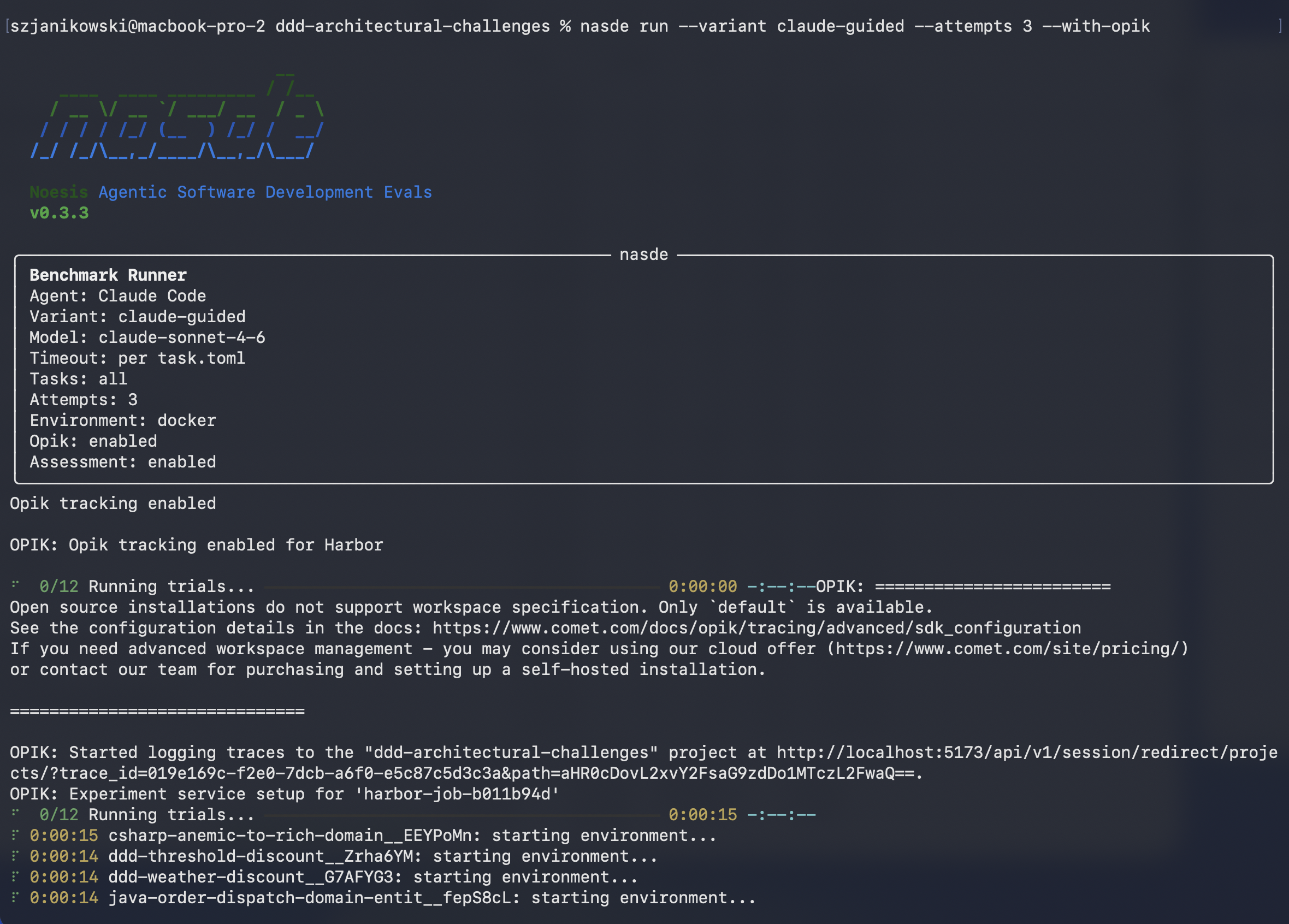
A real nasde run — it echoes the exact configuration under test, then streams each trial as it executes.
Start small
One task is enough to validate the loop. Scale up once it works end to end.
Your subscription covers it
Runs use your claude / codex CLI auth — Claude Max or ChatGPT Plus works out of the box.
More in the docs
Full CLI reference, cloud sandbox options, the cost/Pareto story, and the authoring guide: noesisvision.github.io/nasde-toolkit.
Jump straight into the docs:
How does the scoring actually work?
"If there's a test, there has to be an expected result, right?" — yes, and there are two independent kinds, answering two different questions.
1. Initial rough tests — deterministic pass/fail
This is the standard verifier pattern used by Harbor and other coding-agent benchmarks — every task has a tests/test.sh script that runs inside the container after the agent is done. Either it passes (reward = 1) or it doesn't (reward = 0). Nothing AI about this step.
What "passing" means is up to you:
- Bug fix: the regression test that was failing now passes.
- Refactor: the existing test suite still passes.
- Feature: a new integration test you wrote passes.
Hard yes/no on correctness. Says nothing about how the code got there.
2. Multi-dimensional assessment — reviewer agent scores the produced results
Rough tests only catch black-and-white failures. They don't tell you whether the produced workspace is well-structured, respects your architecture, whether tests are meaningful (not just coverage padding), whether a generated document is clear, whether a migration is reversible. For that, Nasde runs a second agent (claude or codex) on the produced workspace.
The reviewer's reference point is two files you write:
assessment_dimensions.json— the dimensions and their max scores (shared across the benchmark).assessment_criteria.md— per task, in plain prose: for each dimension, what a low score looks like, what a high score looks like, what specific things to check.
The workspace also contains the agent's full trace — tool-call trajectory, token usage, wall-clock duration — so your criteria can cover those too, alongside the produced artifacts. One local nasde run handles all of it, no separate LLM-as-a-judge stack required.
The criteria can be as strict or as loose as you want: spell out a ground-truth structure, enumerate exact checks, or leave room for judgment — whatever gives you signal you trust.
Why this stays token-efficient on large codebases
The reviewer is a full coding agent (claude or codex), not a one-shot prompt. That's a deliberate design choice and the single biggest reason Nasde scales to real repositories:
- The repo never goes into the prompt. The reviewer navigates the workspace with
Read,Glob,Grep(and optionally MCP analysis servers), pulling only the files it actually needs to judge each dimension. - Context window isn't the limit. A 500k-LOC codebase is reviewed the same way a 5k-LOC one is — by reading the relevant slices on demand.
Every score comes with its price tag
Each trial reports tokens and dollars next to the quality score — per model, per provider — so a quality number is always paired with what it costs to reach it. That turns the AI-coding line item into something you can actually reason about: quality per dollar, on your own tasks.
Nasde plots models and variants on a quality-vs-cost Pareto frontier — the view a budget owner needs: where the best value sits, where you're overpaying, and the point that matches your quality bar and your spend. It's how you choose where to invest and when a switch is worth it. See Token & Cost in the docs.
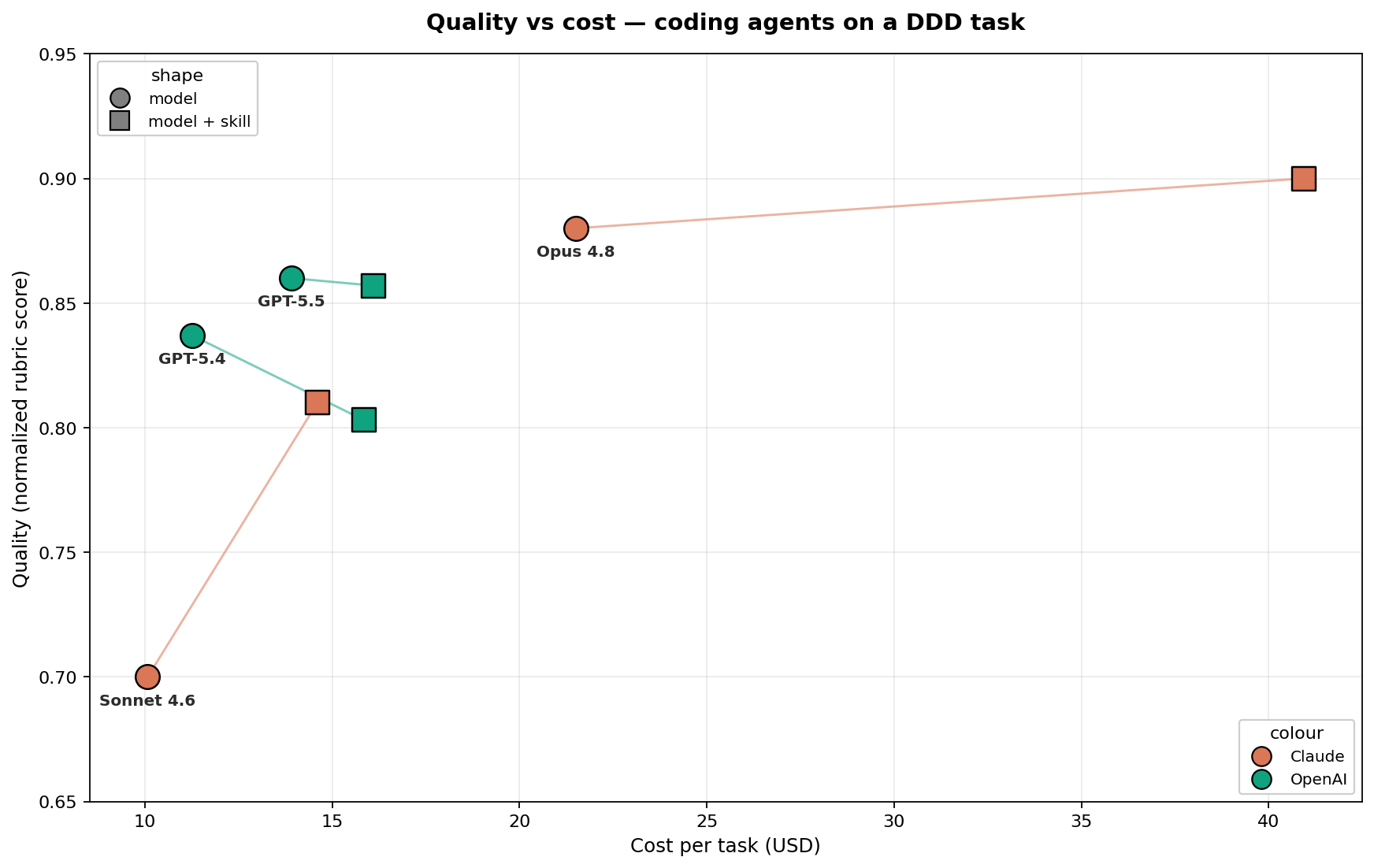
One real task: rubric score against dollars per task. Color = provider, shape = model vs. model + skill. The same skill nudges Claude's quality up and pushes some OpenAI runs down — and the best value isn't the priciest point.
The full pipeline, end to end
One command (nasde run) executes this whole chain and writes results to disk.
Task
instruction + test.sh + assessment criteria
Coding agent
isolated container (Docker / cloud)
Rough tests
reward 0 / 1
Reviewer agent
reads produced workspace + trajectory, scores vs. your criteria
Per-dimension scores
logged locally + optional experiment tracker
Nasde is the glue that connects sandbox execution, rough tests, the reviewer agent, and experiment tracking — all invoked by a single nasde run.
What a real task looks like
Everything above is easier to grasp on a concrete example. Here's one benchmark task from the repo — examples/ddd-architectural-challenges/tasks/ddd-weather-discount — shown end to end: the agent's instruction, the assessment criteria, and the resulting scores.
Task — Implement a weather-based discount.
You are working on an e-commerce system built using Domain-Driven Design and hexagonal architecture (.NET 8, C#). Implement a discount that:
- Checks current weather in Warsaw via the Open-Meteo API.
- Applies a 10% discount when
precipitation > 0. - Must be extensible: more weather-based discounts (temperature, wind, UV, humidity) will follow and should plug in without rewrites.
Quality expectations: fit into the existing DDD architecture · handle API failures gracefully (do not break order processing) · write unit and integration tests · follow codebase conventions.
The criteria spell out what each score means for each dimension. Extract from the Domain Modeling dimension — the benchmark author chose a 0–25 scale here; your own criteria can use any scale that fits (0–5, 0–10, named levels, pass/fail, whatever):
| Score | Criteria |
|---|---|
| 0 | No domain types for weather — raw HTTP responses or primitives used directly in domain logic. |
| 10 | Domain types exist for weather, but they leak infrastructure concerns (JSON annotations, HTTP status codes). |
| 15 | Clean domain types (precipitation as a value object), but discount logic is not modeled as a domain service or policy. |
| 20 | Good domain modeling and discount as a domain service, but error handling uses infrastructure exceptions instead of domain-appropriate patterns. |
| 25 | Weather modeled as value objects · discount encapsulated in a domain service/policy · failures handled via domain patterns (Result type, domain exceptions, safe defaults) · domain layer has zero infrastructure dependencies. |
Key checks for the reviewer agent:
- Is there a port / interface for weather data in the domain layer?
- Does that port use domain types (not
HttpResponseMessage,JsonElement)? - Is the discount rule inside a domain service / policy, or living in the HTTP adapter?
- Are failure modes (API down) handled with domain-appropriate defaults?
The full assessment covers four more dimensions the benchmark author picked for this task (Encapsulation · Architecture Compliance · Extensibility · Test Quality), each with its own ladder and checks. Another author would have chosen different dimensions or different scales for the same task.
| Variant | Pass | Domain /25 | Encap. /20 | Arch. /20 | Ext. /15 | Tests /20 | Total /100 |
|---|---|---|---|---|---|---|---|
| claude-vanilla | 75% | 17.1 | 11.2 | 16.1 | 9.5 | 7.7 | 61.6 |
| claude-guided | 75% | 17.4 | 12.4 | 16.6 | 10.0 | 8.7 | 65.1 |
| codex-vanilla | 89% | 18.8 | 13.8 | 16.8 | 11.4 | 8.7 | 69.4 |
| codex-guided | 50% | 11.5 | 9.6 | 12.9 | 7.4 | 6.0 | 47.4 |
The insight: the same "DDD guidance" skill helps Claude a little (+3.5) and badly hurts Codex (-22). The per-dimension breakdown pinpoints where Codex regresses — domain modeling, encapsulation, extensibility — which would be invisible without this assessment. Skill optimization is agent-specific.
More benchmarks in the repo
Refactoring katas (Java + Python) →
Four classic refactorings (Extract Hierarchy, Break Dependency, Polymorphism, Extract Method) scored on behavior preservation, clarity, technique, scope discipline. Takeaway: a candidate "refactoring skill" didn't move the score — shipping it would have been based on vibes.
Project-specific skill validation (Nasde's own repo) →
One task pulled from Nasde's git history; four skill combinations tested. Takeaway: the testing-discipline skill alone raised pass rate from 67% → 100%; the "full-stack, everything-on" variant scored worse than vanilla.
Full numbers and methodology: Benchmark Results.
Results dashboard
Scores land in local JSON files by default. Pass --with-opik and they also flow into Opik for experiment tracking, comparison, and visualization. Each dimension becomes a separate feedback score — easy to filter, compare, and trend over time.
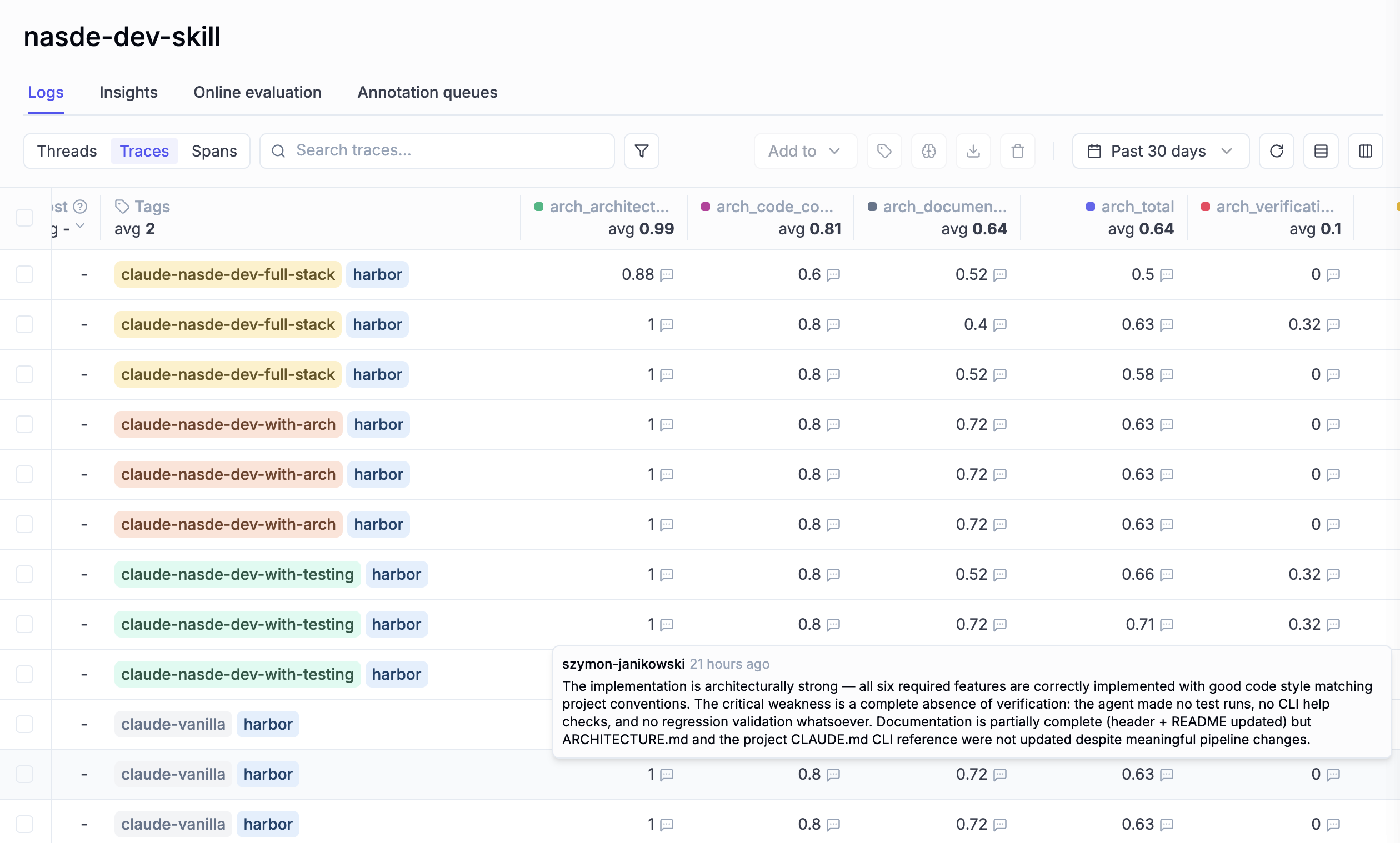
Opik dashboard showing dimension scores across different agent configurations and variants.
Try it on a real problem you've already solved
Nasde is open-source and MIT-licensed. Clone the repo, pick one of the example benchmarks to see how the pieces fit together, then point it at a task from your own git history.